
Exness login problems: fix errors and spot fake pages
Every month thousands of Vietnamese users type “exness login” into Google. The odd part is that many Exness login problems have nothing to do with the password. They come from one basic mix-up:
Exness has TWO completely separate login systems. Newcomers often carry the details for one system to the door of the other, then conclude that their “account is broken”.
Worse, while they fumble around, quite a few people click on fake “exness login” pages built to catch exactly this stream of confused visitors.
The order below untangles it: use the right door, check the error list, then check the page address before you type your password.
Log in to Exness in the right place: the Personal Area is not MT4/MT5
Many “login error” cases end at this two-way table:
| What do you want to do? | Where to log in | Which details to use |
|---|---|---|
| Deposit or withdraw, verify your profile, open more accounts, view history | Personal Area, my.exness.com (or the Exness Trade app) | The email + password you registered with |
| Place orders and view charts on MetaTrader | MT4/MT5 (separate software/app) | Trading account NUMBER + trading password + the correct SERVER (e.g. Exness-MT5Real8) |
The classic mix-up: using your email to log in to MT5 (it says “Invalid account”), or using your MT5 account number to log in to my.exness.com (it says the details are wrong).
Two keys, two doors. Your MT account number and server name sit right in the Personal Area under your accounts, so if you forget them, look them up there. With that rule in hand, we move on to the detailed error list.
Exness login errors: 6 causes and quick fixes
- Wrong or forgotten Personal Area password: click “Forgot password” at my.exness.com and get a reset link by email. An important security note: after sensitive security changes, the system may restrict withdrawals for a short time under its anti-account-takeover policy. Don’t panic; that feature protects you.
- MT4/MT5 login says “Invalid account”: check the server name first. Open the Personal Area, find the exact server name for the account (Real/Trial + number), and type it exactly in MetaTrader. A correct account number and password with the wrong server still fails.
- No verification code (2FA/OTP) arrives: check your spam folder; if you use an authenticator app, resync your phone’s clock (a code with the wrong time is invalid); switch between Wi-Fi and 4G if the email is slow to arrive.
- Account temporarily locked after too many wrong attempts: wait as the notice says, then try again with “Forgot password” instead of guessing further; each extra wrong guess only extends the lock.
- The website hangs or shows a blank page: try a private browser window or the Exness Trade app; clear the cache; check your connection. Wide outages are rare but they happen, so wait 15–30 minutes before deciding that your account has a problem.
- “Account does not exist” even though you are sure you registered: check whether you are typing a secondary or old email; people with several email addresses often forget which one they registered with. Search your old inbox for the Exness welcome email to find out.
All six errors above are harmless and you can fix them yourself in a few minutes. But there is a seventh “login error” that is not harmless at all, because it is not your mistake.
Warning: fake Exness login pages, the trap for people typing in a hurry
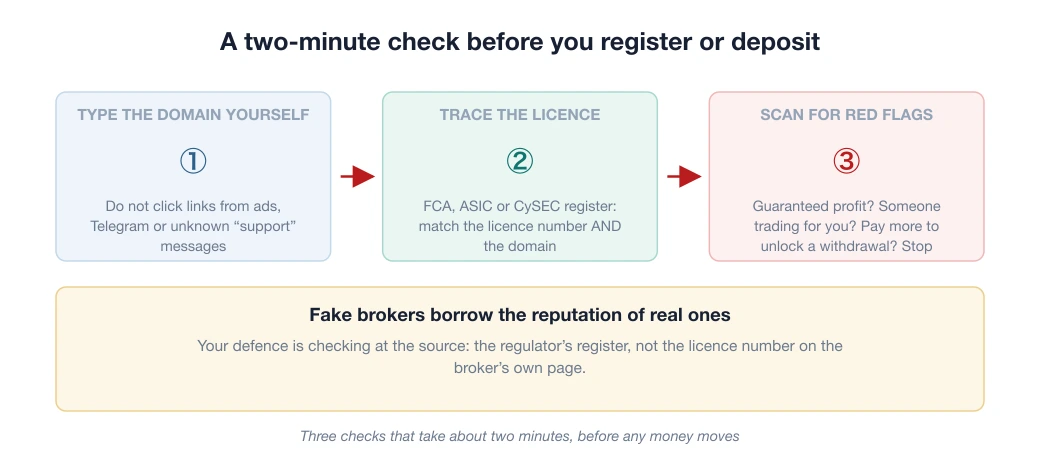
The police have named websites imitating the Exness name (such as xtbexnesss.com), set up to harvest the details and money of confused users. The details are in the Vietnamese article on fake brokers posing as reputable ones.
A fake login page is more dangerous than a fake home page, because on it you actively TYPE your email and password. The iron rule: log in only at my.exness.com or in the Exness Trade app downloaded from the official App Store or Google Play.
Never click a login link from an unknown email or a Zalo/Telegram message, even when “support” claiming to be Exness staff sends it. Do not give your password or OTP code to anyone over a message.
Already typed your details into an unfamiliar page? Change your password at my.exness.com right away and turn on 2FA, a feature worth enabling from day one, as in the security checklist below.
When Exness won’t work: your fault or the platform’s?
Logged in but haven’t installed the app on your phone yet? See the Vietnamese guide to downloading the Exness app. And if you have decided to stop altogether rather than fix errors, see the Vietnamese guide to closing an Exness account properly; withdraw all your money and save your trading history first.
The section above deals with errors on your side. A different group of situations calls for the opposite response: the broker freezes, hangs, won’t open, or one function is locked by region. Here, retrying more only does harm, because each wrong entry also raises the risk of a temporary lock.
Tell them apart in 2 minutes, in exactly this order:
- Try a different device and a different network (a phone on 4G instead of Wi-Fi). If it works on the other device, the problem is in your machine or your network, not the broker; go back to the 6 causes above.
- Check which platform is broken. The Personal Area and MT4/MT5 are two separate systems. If the Personal Area opens but MT5 won’t fill orders, or the other way round, that is a local fault, not “the broker is down”.
- If both devices and both platforms fail, this is a fault on the broker’s side. What to do now is not to retry but the step below.
You have an open trade and can’t get in: what to do
In this situation you have money running while you have lost control of it. The order to handle it:
- Don’t open a new trade on another account to “win it back”. You cannot see the real state of the old position, so any decision now is a blind guess.
- Try the mobile app. MT4/MT5 mobile runs over a different connection from the desktop version, and in quite a few cases it gets in while the computer version hangs.
- Contact support and ask them to close the trade manually. The broker has a channel for this situation. State your account number, the order ID and the time you lost the connection.
- Take screenshots of everything at that moment: the error message, the clock, the order history. If there is a dispute later about the closing price, this is the only evidence you have.
Prevention comes down to one step taken in advance: set a stop loss on every trade. A stop loss sits on the broker’s server, so it still works even when you lose your connection completely. It is the only layer of protection still running when you cannot get in. See also money management.
A special case: functions restricted by region
“Not working” is not always a technical fault. Sometimes a specific function is limited by region or by account type. You still log in normally, but one option disappears.
How to recognise this group: everything else works normally, only one option is missing, and it is missing on both your phone and your computer. Don’t waste time troubleshooting; open the deposit section of your account to see which methods are actually available, then plan your withdrawals through those same methods.
Can’t get into Exness: is it you, the network, or the broker?
The real question for you at this point is usually not “how do I fix it” but “which side is broken”.
Answer that wrongly and every step after it is wasted: reinstalling the app when the fault is with your carrier, or sitting and waiting when all you needed was to change DNS. The three steps below separate the three possibilities, and you can do them on a phone.
Step 1: Does the domain resolve?
This test separates “the carrier is blocking it” from every other cause. If the domain does not resolve to an IP address, the browser shows an error like “server not found”. And that is not the broker’s fault.
If your device cannot resolve the domain, check the DNS of the carrier you are using before blaming the broker.
How to do it yourself: switch your phone temporarily to mobile data instead of Wi-Fi (the two routes usually use different DNS). If it opens on one network and not the other, you have your answer.
Step 2: Does the server answer, and what does it say?
When the site does not open, the cause falls into one of three states that are easy to confuse:
- 403 = the server is ALIVE and answering; it is only refusing that kind of access. Many brokers block automated tools but still serve ordinary users’ browsers.
- No response / timeout is the real sign of a problem on the server side.
- The domain does not resolve is a step 1 issue, not a broker issue.
These three states look identical on a phone screen, all of them “can’t get in”, but the causes and fixes are completely different.
Step 3: Is it only you, or everyone?
If you pass both steps above and it still doesn’t work, ask in a community group: “can anyone get in right now?” If several people report a fault at the same time, it is on the platform’s side, and what you need to do is wait, not reinstall anything.
If only you are affected, go back to the 6 causes above.
If you are searching because you heard “Exness is blocked in Vietnam”
Two things that often get lumped together need separating. Whether a website can be reached is a technical matter.
Whether that service is allowed to operate is a legal matter, and in Vietnam the answer applies equally to every international forex broker: the State Bank of Vietnam has not licensed any forex trading platform.
In other words, being able to get in today does not mean it is legal, and not being able to get in today does not mean the broker has collapsed. The full legal framework is in the Vietnamese article is forex legal in Vietnam; this broker’s own file is in is Exness a scam.
If you suspect the problem is legal rather than technical, see the Vietnamese article is Exness banned in Vietnam.
3 security locks to turn on as soon as you can log in
- Turn on two-factor authentication (2FA) in the security settings: 30 seconds to set up, so that someone holding a leaked password still cannot get in without the authentication code.
- Set an MT trading password different from your Personal Area password: two doors, two different locks, so losing one does not cost you both.
- Check that your registration email is still secure: the email is the “master key” that receives password reset links; if the email is weak, every other lock is pointless.
Once you are logged in, every next step already has a guide: Exness deposits and withdrawals (including how withdrawal processing works), or, if you don’t have an account yet and are reading this to prepare, signing up for Exness step by step in 15 minutes.
Still deciding whether to use Exness at all? The Exness review 2026 scores it on all 6 criteria, both the strengths and the weaknesses.
Frequently asked questions
Where is the official Exness login?
The Personal Area at my.exness.com (log in with email + password) or the Exness Trade app downloaded from the App Store or Google Play. To trade on MetaTrader, log in to MT4/MT5 with the trading account NUMBER + trading password + the correct server.
Why does my Exness MT5 login say Invalid account?
Usually because the wrong server is selected. Go to the Personal Area, find the exact server name for the account (for example Exness-MT5Real8), then type it in exactly. With the wrong server, a correct account number and password still will not get you in.
What do I do if I forget my Exness password?
Use “Forgot password” at my.exness.com to get a reset link sent to your registered email. Note that after a security change, withdrawals may be briefly restricted under the anti-account-takeover policy.
How do I know an Exness login page is real?
Trust only my.exness.com typed by hand and the official app from the App Store or Google Play. Do not click links from unknown emails or messages, and do not give your password or OTP to anyone claiming to be Exness staff. Websites imitating the Exness name have been named by the police before.
Spotted something inaccurate? Tell us and we will check it and publish a correction.