
How to download the Exness app: Exness Trade or MT4/MT5
Many Vietnamese traders now trade Exness on their phone, so “where do I download the Exness app, and which one?” is the first step everyone runs into.
The easy mistake: Exness does not have just one app. Each app logs in with something different, and installing the wrong app or downloading from an unofficial source is where newcomers tend to trip up.
How many apps does Exness have, and which should you use?
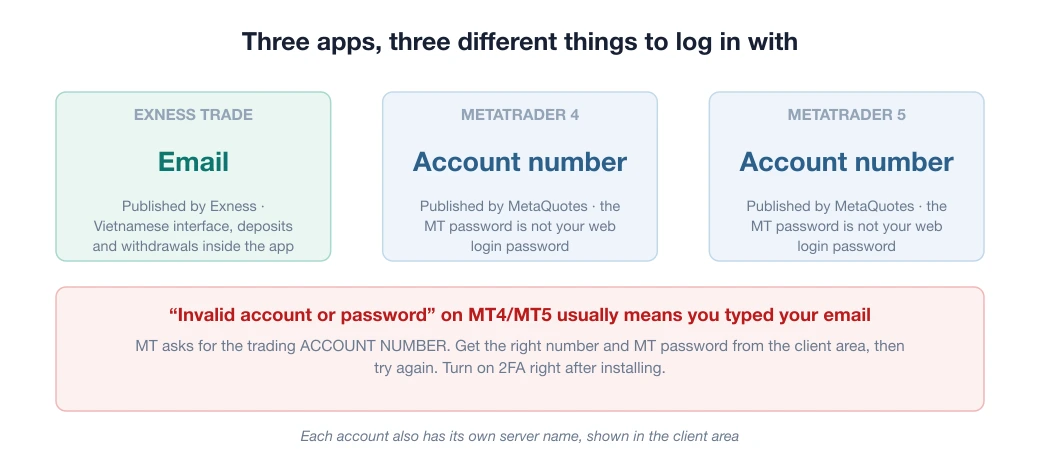
There are three options, and they serve different purposes. Installing the wrong app is a common reason newcomers struggle to log in:
| App | Publisher | Log in with | Strengths | Suits |
|---|---|---|---|---|
| Exness Trade | Exness | Email + password | Vietnamese interface, deposits and withdrawals inside the app, manages all your accounts | Newcomers, basic trading |
| MetaTrader 4 | MetaQuotes | Trading account number + MT password | Many indicators, runs EAs, large community | People already used to MT4, EA users |
| MetaTrader 5 | MetaQuotes | Trading account number + MT password | More timeframes and order types than MT4 | Traders who need advanced tools |
The difference sits in the “Log in with” column. Exness Trade uses your email, like any ordinary app.
MT4/MT5 are third-party software (from MetaQuotes), so they need your trading account number (the string of digits you receive when you create an account), your MT password, and the correct Exness server. Without knowing this, many people assume their “account is broken”. The details are in the Vietnamese article on logging in to Exness on MT4/MT5.
You do not need all three. The practical suggestion: start with Exness Trade, and only add MT4/MT5 when you really need advanced indicators or want to run an EA (an automated trading program).
Download the Exness app from the right source (this matters for security)
- Android: download from Google Play, search for “Exness Trade” or “MetaTrader”, and check that the publisher name is exactly Exness/MetaQuotes.
- iOS: download from the App Store the same way.
- Avoid loose APK files (Android install files) sent over Zalo/Telegram or from unknown websites. This is a channel for spreading fake apps that steal accounts. The principle is the same as when you open an Exness account: use official sources only.
Log in and start trading
- Open the app, choose Log in, and enter the email and password of your existing Exness account (no account yet? register first).
- Turn on 2FA (two-factor authentication) right away. The app is tied to real money, and this layer of protection is free.
- Deposit right inside the app, using a method shown in your Personal Area (see the deposit and withdrawal guide), pick a pair and place an order.
- To keep costs down, check the rebate (backcom) by account type before you trade a lot.
If you choose MetaTrader: MT4 or MT5?
A classic question, and the answer is not “MT5 is newer, so it is better”. The two platforms are not compatible: indicators and EAs written for MT4 do not run on MT5, and vice versa:
- Choose MT4 if you mainly trade currency pairs, or plan to use ready-made indicators/EAs from the community. The library of community indicators/EAs written for MT4 is still very large, and many Vietnamese-language guides online are written for MT4.
- Choose MT5 if you need more timeframes (21 versus 9), extra pending order types, and want to trade stocks/indices alongside forex.
The practical answer for a Vietnamese beginner: if you have no specific reason to use MT5, stick with MT4, because guides and community help are easier to find. And if you only trade by hand and keep it simple, Exness Trade is enough, with no need for MetaTrader.
Does Exness have a trailing stop? Yes, but not in the app
Yes. In the Vietnamese edition of the Exness documentation it is called “dời điểm chốt lỗ”, and it automatically moves your stop loss (the price at which a losing trade closes) behind the current price by the number of points you set.
But the official documentation, updated 20/08/2026, states clearly that this function is only available in the desktop versions of MT4 and MT5. The Exness Trade app and the mobile versions of MT4/MT5 do not have it.
One more condition easily makes newcomers think something is broken. The trade must already be in profit by exactly the number of points you want to set before the option switches on; until then you cannot use it.
On a computer: right-click the open trade in the Trade tab, choose Trailing Stop, then pick one of the preset point values or enter your own.
4 things to do right after installing the app
- Turn on two-factor authentication (2FA). The app is tied to real money, and this is the layer of protection to switch on first.
- Turn on biometric lock (fingerprint/Face ID) for the app, in case you lose your phone.
- Set price alerts for the pairs you follow, so you do not have to keep opening the app.
- Run one small test trade (or use a demo account) to get used to placing an order, a stop loss and a take profit before you place a real trade that matters. Tapping the wrong button on a small screen is very easy to do.
5 common errors in the Exness app and how to fix them
- “Invalid account or password” on MT4/MT5. The usual cause: you typed your email while MT4/MT5 asks for your trading account number. Go to the Exness client area, get the correct account number and MT password (different from your web login password), then try again.
- Cannot find the server when logging in to MT. Each account is tied to its own server (the name appears in the client area). Type the exact server name into the search box instead of picking one at random from the list; choosing the wrong server will always report a wrong password.
- Not receiving the 2FA/OTP code. Check that your phone clock syncs time automatically, because a clock drift makes verification codes invalid. Prefer an authenticator app over SMS, since SMS is often blocked or delayed.
- Prices in the app stop updating and the chart freezes. This usually comes from a patchy connection or a closed market (the weekend). Check your connection, then log out and back in; on a Saturday or Sunday, frozen prices are normal.
- Downloading a fake app by mistake. Check the publisher name (Exness / MetaQuotes) and the download count in the store. Never install an APK file someone sends you over Zalo/Telegram, even if they claim to be “Exness support”.
Trading on a phone: 3 practical notes
- Set a stop loss (SL) the moment you open a trade. On a phone, editing an order while the market moves fast is error-prone, and setting the SL from the start is the cheapest layer of protection.
- Be careful with convenience. The worrying risk of mobile trading usually does not lie in the technology, but in placing impulsive trades because the phone is always in your pocket. Keep the same money management rules as when you sit at a computer, and do not open a trade just because you have time to kill.
- Turn on price notifications instead of opening the app all the time. Price alerts let the system tell you when the market reaches the zone you care about, instead of you watching the chart all day and entering a trade out of impatience.
Exness has a solid review record and the app is fairly stable. Once you are used to the controls, compare the rebate per lot to bring down your trading costs over the long run.
Frequently asked questions
Where is it safe to download the Exness app?
Only from Google Play (Android) or the App Store (iOS), and check that the publisher is Exness (for the Exness Trade app) or MetaQuotes (for MT4/MT5). Avoid APK files sent by message or from unknown websites, because they may be fake apps built to steal accounts.
Should I use the Exness Trade app or MT4/MT5?
Newcomers should use Exness Trade because it is simple, available in Vietnamese and has deposits and withdrawals built in. If you need many indicators or want to run EAs, add MT4/MT5 as well. You do not need to install all three.
Does it cost anything to download the Exness app?
No. Exness Trade and MT4/MT5 are all free to download from the store. You only need capital to fund your account when you trade.
What should I do if I cannot log in to the Exness app?
This usually comes from logging in to the wrong kind of app: Exness Trade uses your account email and password, while MT4/MT5 need your trading account number plus the MT password. Check which app you are using and see the Exness login guide.
Spotted something inaccurate? Tell us and we will check it and publish a correction.