
How to open an Exness account and pass KYC in 15 minutes
Once you have registered you can deposit and trade straight away. The Withdraw function, though, is not open yet.
Many people only find that out when they want to take money out, which is a few weeks later than they needed to.
Fifteen minutes, from nothing to your first trade. Below is the exact order I clicked through on screen.
Have these ready first:
- An email address and phone number you actually use. Both receive verification codes.
- Photos of both sides of your national ID card, sharp and free of glare.
- A document showing your name and address from the last 6 months: an electricity or water bill, or a bank statement.
- A small sum for the first test deposit, enough to go through a full deposit and withdrawal cycle.
Along the way I cover the spots where newcomers tend to stumble and that no official guide mentions, from choosing the account currency to the high-leverage trap. Leverage: the mechanism that lets you control more money than your own capital.
Minutes 0–3: Register
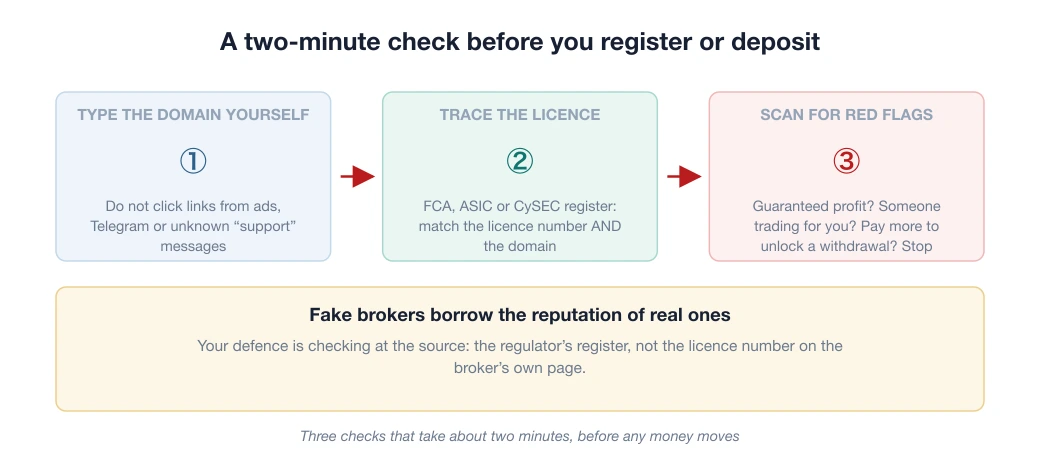
Go to exness.com and type the address by hand. It sounds excessive but it is not: Vietnamese police have named a fake website, "xtbexnesss.com" (XTB + Exness glued together, plus an extra "s"), set up purely to take money from people who clicked the wrong link in an ad. Details are in the article warning about fake brokers.
Register with an email and phone number you actually use (you will receive verification codes), and choose Vietnam as your country of residence. That detail decides which payment methods appear in your Personal Area, because the list depends on your country.
The form will ask whether you want a real or a demo account. Open both. Use the demo to click around the platform until it feels familiar, over one or two evenings.
But do not stay on demo too long. Trading play money and trading real money feel worlds apart psychologically, and the real lessons only start once there is a little real money on the table.
There is a detail right on the registration form that almost nobody reads: the small print names the company that will hold your account.
That company, not the brand, is the party to your contract (the legal entity), and it decides your level of protection and where you can complain. It sits right in front of the button, not hidden in the terms, so read that line before you click.
If you have never traded, pick the demo account first. Trading play money and real money feel different, but the platform is identical, so a demo is enough to get used to it.
You will need a real email and phone number on the very first screen; verification codes go to both.
Those three minutes give you an account you can log in to. They do not yet give you the right to withdraw, and that is the point many people discover last.
Minutes 3–10: KYC, the fastest step and the easiest to get wrong
Why you should not leave KYC "for later": Exness splits verification into 3 steps, and step 1 alone, confirming your email and phone number, is what unlocks the Withdraw function.
So if you skip it, you can still deposit and trade, but you only discover you are not eligible when you want to take money out. Step 3 (verifying your residential address) is what removes deposit limits and opens every payment method available to you.


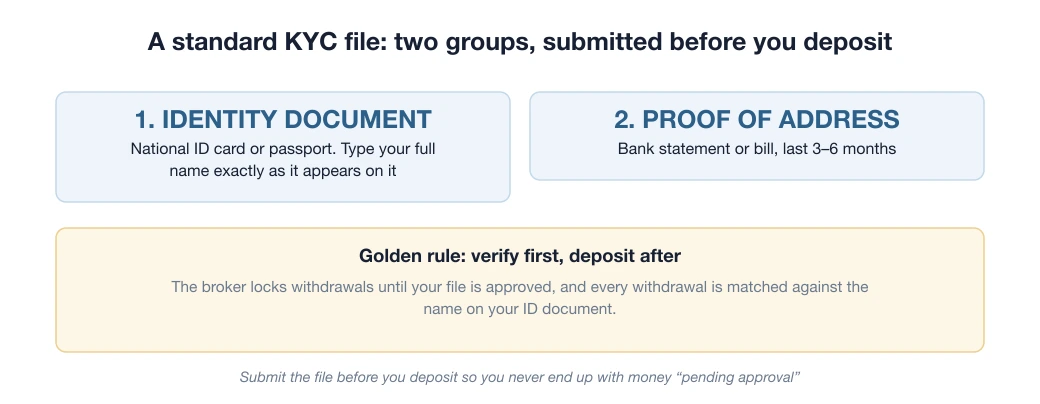
Personal Area → Verification. Exness reviews most submissions automatically, so the speed depends on the quality of the images you upload: good images get a result in 3–7 minutes, poor ones drop into the manual review queue, sometimes for 24 hours. You need two groups of documents:
- Identity document: national ID card, passport or driving licence, photographed on both sides.
- Proof of address: an electricity or water bill or a bank statement from the last 6 months, showing your name and address. A PDF downloaded from your banking app works well.
The 4 mistakes that get submissions sent back most often (compiled from community reports):
- Glare, blur or cropped corners: lay the document on a flat table in even light and shoot straight down from above.
- Images run through an editing app or scan filter: the anti-fraud system is very sensitive to processed images.
- A proof of address older than 6 months or in someone else's name (a household bill in a parent's name is the classic case; use your own bank statement instead).
- Names that do not match: the rule for the whole life of the account is name on the document = name on the Exness account = name on the payment method you deposit from and withdraw to. If one of them differs, the system will block your withdrawals later.
For the phone OTP, read the warning inside the message itself. The verification code sent via Zalo is valid for 5 minutes, and the message says outright "Absolutely DO NOT share your phone verification code with anyone in any form".
This is a very common way people lose their accounts: a scammer calls claiming to be broker staff or "IB support staff" (an IB is someone who introduces clients to the broker and earns a commission), gives a technical excuse and asks for the code.
No genuine employee needs your code; genuine staff already have access to the system. I masked the code in the image below for exactly that reason.
Once you are past the verification code, the rest of KYC has no more traps, only places where it is easy to be careless.

Identity verification: 12 questions and 2 sides of a document
What surprises many people: identity verification at Exness is more than uploading photos of a document. Before that comes a 12-question questionnaire about why you are opening the account, your experience and the source of your funds.
This is a suitability assessment that regulators require, not a pointless formality. Answer honestly, because your answers are attached to your profile.

The document upload is handled by Sumsub, a third-party identity verification company. For Vietnamese users the default document type is the Citizen Identity Card, and you need both the front and the back.
The one requirement worth noting: every detail on the image must be clearly legible. Blurred images, glare or missing corners are what gets a file sent back, and each failure adds another round of waiting for review.
Once your profile is green, the question changes. It is no longer "can I open one" but "which type should I open".

Does Exness require proof of income or proof of assets?
No. The documents Exness asks for fall into just two types: proof of identity (POI) and proof of address (POA).
The document Verification document requirements, updated 31/08/2026, sets that boundary in its first sentence.
"Verification documents include both proof of identity (POI) and proof of address (POA) documents."
No item asks for payslips, an employment contract, a savings book or property papers.
The confusion comes from two words: economic profile.
The broker's registration guide lists three things needed to verify and keep an account: an economic profile, proof of identity, and proof of address.
Skim it and "economic profile" sounds like a stack of financial paperwork. In practice it is the part you fill in yourself, which is the 12-question questionnaire in the identity verification step.
You choose answers about your occupation, source of funds and trading experience. You do not attach evidence for those answers.
That does not mean you can answer however you like. The answers are attached to your profile, so answering honestly is still the least troublesome route later on.
The seven conditions for an identity document, which is where submissions usually get sent back
- it has your photo
- the full name matches the account holder's name
- the date of birth shows you are 18 or older
- it is valid within 3 months of the upload date, in the document's own wording
- both sides are submitted if the document has more than one page
- all four corners are visible
- the image is clear, not blurred, and the document is issued by a government authority
Passports, identity cards and driving licences are all on the accepted list.
Review takes up to 24 hours, and if the status has not changed after that, open a request with support rather than uploading again on top.
A detail that saves time: in some regions one document can serve as both POI and POA if it already carries both your identifying details and your residential address.
Minutes 10–12: Choose an account type, the table settles it
| Account | Minimum deposit | Cost | Suits |
|---|---|---|---|
| Standard Cent | Lowest in the group | Floating spread, no commission; lots counted in cents | Never traded real money; risk per pip is only a few hundred dong |
| Standard | Lowest in the group | Floating spread, no commission | Most traders; balanced and easy to understand |
| Raw Spread | Higher | Spread ~0.0 + fixed commission | Scalpers/EAs, high-frequency trading |
| Zero | Higher | 0 spread on many pairs + commission | Those who need an absolute 0 spread during news |
| Pro | Large | Low spread, no commission, market execution | Large capital, manual trading |
Spreads can fluctuate and widen due to market volatility, news events, market open/close and other factors.
Exness does not publish a fixed minimum deposit. The broker's official documentation (updated 30/07/2026) says the actual figure depends on four things: account type, payment method, regional requirements, and market conditions.
The correct figure for your account appears in the deposit section once you choose a channel.
"Standard and Standard Cent accounts require a low minimum first deposit, depending on the payment method… The Professional account type has a minimum first deposit of 200 USD (subject to regional requirements)."
That is the only figure Exness names outright, and it applies only to the Professional group. For Standard and Cent the broker deliberately gives no number, because it changes with the deposit channel and the region.
A newcomer only needs to remember one line: never traded real money → Standard Cent; you understand what you are doing → Standard. Keep Raw/Zero for when you trade often enough; at that point you just open another account under the same profile, without registering again.
A tip few people know: under one Exness profile you can create several trading accounts, so a good approach is to create 1 Cent + 1 Standard straight away. Use Cent to test new strategies and Standard for your main trading.
When you create an account, the system asks for the account currency: choose USD. That sounds backwards for a Vietnamese trader, but every price table, every calculator and every document is denominated in USD, and a USD account lets you cross-check without discrepancies. The payment method handles the conversion to and from your local currency when you deposit and withdraw.
On leverage: Exness offers high leverage, with the specific level depending on account type, equity and the applicable regulations. That is a double-edged sword. High leverage does not force you to trade big. But it lets you trade big in a moment of poor self-control.
Many accounts blow up in the first month for that reason, before right or wrong analysis even has time to matter.
Newcomers should limit themselves: risk 1–2% of the account per trade and work out the lot size (the unit of position size, with 1 standard lot equal to 100,000 units) before placing the order, not by "feel".

Right after you create the account, Exness asks whether you want "Risk-free demo trading" or "Trading with real money".
For newcomers, we recommend choosing the demo account first. The point is not to practise pressing buttons but to check whether your strategy survives a few dozen trades before your first loss is real money.
Once you have chosen an account type, the declarations are done. From here on, every action involves real money.

Minutes 12–15: Make your first deposit and place a trade
Once verification is complete, choose a deposit method shown in your Personal Area; the list depends on your country and the company that holds your contract. Use only methods held in your own name.
The minimum for each method appears in the deposit section when you choose it, and it differs between methods, so do not apply one method's figure to another.
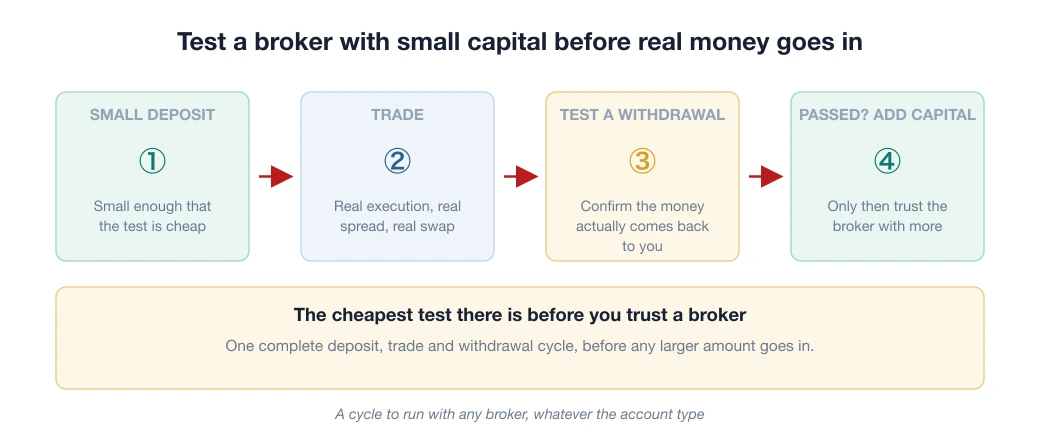
My advice for the first time: deposit a small amount first (300,000–500,000 VND), go through a full deposit→trade→withdraw cycle to see for yourself how the system behaves, and only then deposit the amount you actually plan to trade with.
The deposit and withdrawal rules and what to do when things are slow are in the article on Exness deposits and withdrawals.
Platform: download MT4/MT5, or use Exness Terminal in the browser, which needs no installation and suits newcomers. Log in with your trading account number (which is different from the email you use for the Personal Area; mixing the two up is the classic "why can't I log in").
3 small things worth doing right after opening
- Turn on 2FA: the account is tied to real money, and this 30-second layer of protection is free.
- Withdraw a small amount after your first few trades, to check for yourself that the withdrawal process works once everything is in order. Processing time may vary depending on the payment method you choose. Knowing "I really can withdraw" is worth more than any review, ours included.
- Pick the right account type and turn on the rebate: if you are unsure between Standard and Raw/Zero, see the comparison of Exness account types; and open through a partner to receive the Exness rebate (backcom) on every lot you trade.
- Read the limitations section of the Exness review: every broker has a downside, and knowing it in advance means no surprises later. If you are still weighing brokers in the same segment, see Exness vs XM, which puts the two brokers side by side on the same criteria.
Frequently asked questions
How long does it take to open an Exness account?
Registration takes only a few minutes. KYC verification is usually approved within 3–7 minutes, in some cases up to 24 hours. Once verified, you can deposit and trade straight away.
What is the minimum deposit at Exness?
Exness does not publish a fixed figure. According to the broker's official documentation (updated 30/07/2026), the actual minimum deposit depends on four factors: account type, payment method, regional requirements and market conditions. Specifically: Standard and Standard Cent require a low first deposit that varies with payment method and location; the Professional group (Pro, Raw Spread, Zero) requires a higher first deposit. To start with the smallest amount, Standard Cent is the type with the smallest minimum position size, or use the free demo account before depositing anything.
Do I need to verify my account to open one at Exness?
Yes. To deposit and withdraw real money, Exness requires identity and address verification under its rules. Complete KYC from the start so that withdrawals are not held up later.
Which Exness account type should a beginner open?
Standard Cent if you have never traded real money, because lots are counted in cents so the risk per pip is only a few hundred dong. Standard if you already know how to place trades and manage capital. Raw Spread and Zero are only worth considering when you trade often enough for the cheaper commission to pay off, and you add them under the same profile rather than registering again.
How many Exness accounts can one person open?
Each verified profile lets you create several different trading accounts without registering from scratch. A common setup is one Cent account to test new strategies and one Standard account for your main trading.
- Exness. Verification document requirements (updated 31/08/2026). Source for the POI + POA scope and the seven conditions for an identity document
- Exness. What information matters when registering an Exness account (updated 25/08/2026). Source for the three things needed: economic profile, POI and POA
- Exness. Official Help Centre, "What is the minimum amount needed to start trading?" (Vietnamese edition, updated 30/07/2026): the minimum deposit depends on account type, payment method, region and market conditions; the Professional group requires more than Standard
- Exness. Deposits and withdrawals (official page)
Spotted something inaccurate? Tell us and we will check it and publish a correction.