
How to close or delete an Exness account safely
Plenty of people search “delete Exness account” expecting a “Delete permanently” button that ends it in one click. There is no instant button like that, and that is good for you: it stops you from deleting an account by mistake while money is still in it.
In practice, “deleting an Exness account” comes at two levels: hiding or closing a trading account (you do this yourself) and closing the whole client profile (this has to go through support). Follow the safe order and you will not lose money or get your data stuck.
Before you delete: 2 things you must do
- Withdraw all your money. Once the profile is closed, recovering any leftover balance gets much more complicated. Withdraw everything to a bank account or wallet in your own name; see the Exness withdrawal guide if you need it.
- Save your trading history & statements. Download your trading history and account statements before closing. You may need them for a tax declaration or to reconcile later. After the profile is closed, you cannot access them again.
Pick the right level: what do you actually need?
Before you do anything, work out which case you are in. Picking the wrong level only makes things harder for you later:
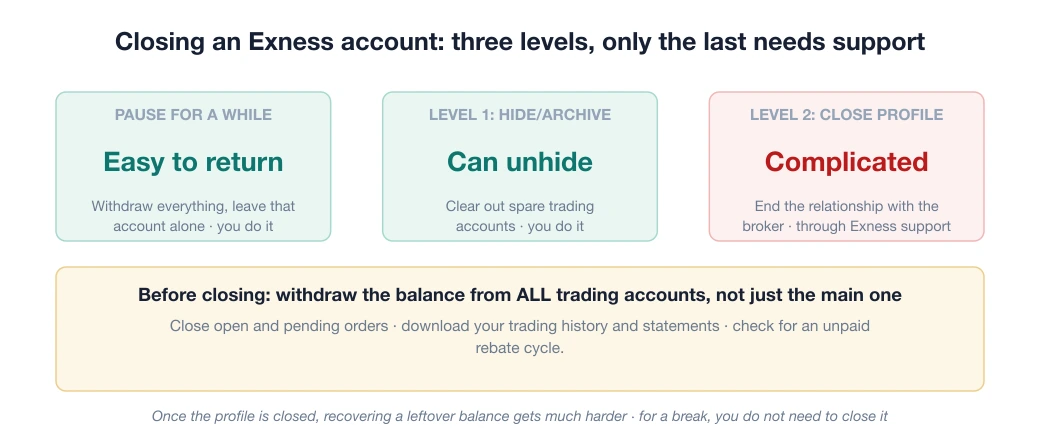
| You want to | What to do | Who does it | Can you come back? |
|---|---|---|---|
| Pause trading for a while | Withdraw everything and leave that account alone | You | ✔ Easily |
| Clear out spare trading accounts | Hide or archive the trading account | You | ✔ You can unhide it |
| End your relationship with the broker for good | Ask for the client profile to be closed | Exness support | Complicated |
Many people who search “delete Exness account” only need the first two rows: they want to stop trading, not delete their profile. If that is you too, closing the profile is an unnecessary step, and it makes coming back later harder.
Level 1: Hide or archive a trading account (do it yourself)
If you only want to tidy up or stop using one trading account, rather than deleting the whole profile, Exness lets you hide or archive a trading account right in the Personal Area, in the account management section.
A hidden account no longer shows in your active list, but its history is kept, and you can unhide it when needed. This suits you if you want to keep your Exness profile but make it tidier, for example by dropping a demo account, a strategy-testing account, or an account opened as the wrong type.
Note: an account that still holds a balance or has open orders usually cannot be hidden. Close all orders and transfer or withdraw all the money first.
Level 2: Close the whole client profile (through support)
To close the profile for good and end your relationship with the broker, you need to contact Exness support, through live chat in the Personal Area or the support email, and ask for the account to be closed. They will verify your identity, to confirm you are the real owner, before processing it.
This is the only official way to close the profile. No automated action replaces it, and you should not trust third-party “deletion services” either.
3 things to know after closing
- Your KYC data is not deleted right away. KYC is the identity check, and the documents you submitted for it stay on file: under anti-money-laundering rules, the broker must keep identity records for a set period even after you close the account. This is normal at every licensed broker, not Exness “keeping data for some purpose”.
- Reopening can hit snags. If you want to come back later, opening a new account with the same documents sometimes means contacting support to reactivate it, rather than registering completely fresh.
- Do not close just because of one slow withdrawal. Many “I want to delete my account” cases are really frustration over a withdrawal hiccup, often caused by a name mismatch or incomplete KYC, and these can be fixed without closing the profile. Read the troubleshooting part of the deposit and withdrawal guide before you decide.
Checklist before closing the profile
If you have decided to close for good, run through this list in order. Skipping a step can cost you money or data:
- Close every open order, including pending orders. Orders still hanging will block the closing process.
- Withdraw the balance from all trading accounts, not just the main one. Many people forget a secondary account still holding a few tens of USD.
- Check for rebates (backcom) not yet received. If you get a per-lot rebate, the payment for the last cycle may not have arrived yet. Wait until it is paid in full before you close.
- Download your trading history & statements to your computer (PDF/Excel format). After closing, you cannot access them again.
- Take a screenshot of the final zero balance, as evidence in case you need to reconcile.
- Remove the linked wallets and bank accounts saved in the payment methods section.
- Contact support and state clearly that you want the profile closed; keep the conversation until you get confirmation.
If you plan to move to another broker
Closing because Exness does not suit you is a legitimate reason, but pick where you are going before you leave.
Re-read the Exness review to make sure your problem is not something you can fix, such as the wrong account type or costs you have not yet optimised.
Then check the ranking of reputable brokers and the scam warning files, so you do not jump from a good broker to a riskier one.
A calmer approach: keep your Exness profile empty, with everything withdrawn, open a small account at the new broker and test it for a few weeks. If the new broker works out, closing the old profile then is not too late; if it does not, you still have a way back without redoing KYC from scratch.
Frequently asked questions
Can I get my money back after deleting an Exness account?
You must withdraw all your money BEFORE closing the profile. After the profile is closed, recovering any leftover balance is much more complicated. Always withdraw everything to an account in your own name, then ask for the closure.
Is there an instant delete button for an Exness account?
No. You can hide or archive a trading account yourself in the Personal Area, but to close the whole client profile you have to contact Exness support and verify your identity.
Can I reopen an Exness account after closing it?
Possibly, but sometimes you need to contact support to reactivate it with the same documents instead of registering again. If you only want a pause, hide the trading account rather than closing the whole profile.
Does Exness delete my personal data after I close my account?
Under anti-money-laundering rules, licensed brokers must keep identity (KYC) records for a set period even after the account is closed. This is a general industry rule, not something specific to Exness.
Spotted something inaccurate? Tell us and we will check it and publish a correction.