
Forex order types: which let you set the price, which slip
Short answer: every order type belongs to one of two groups, the group where you TAKE the market price and the group where you SET your own price. A market order belongs to the first: it fills immediately, but the market decides the level it fills at.
A pending order belongs to the second: you name the price, and in exchange it may never fill. Getting this right matters more than memorising the names of the four order types, because it decides whether you suffer slippage (a fill that differs from the price you saw when you clicked).
Market orders: the fastest, and the type that takes slippage
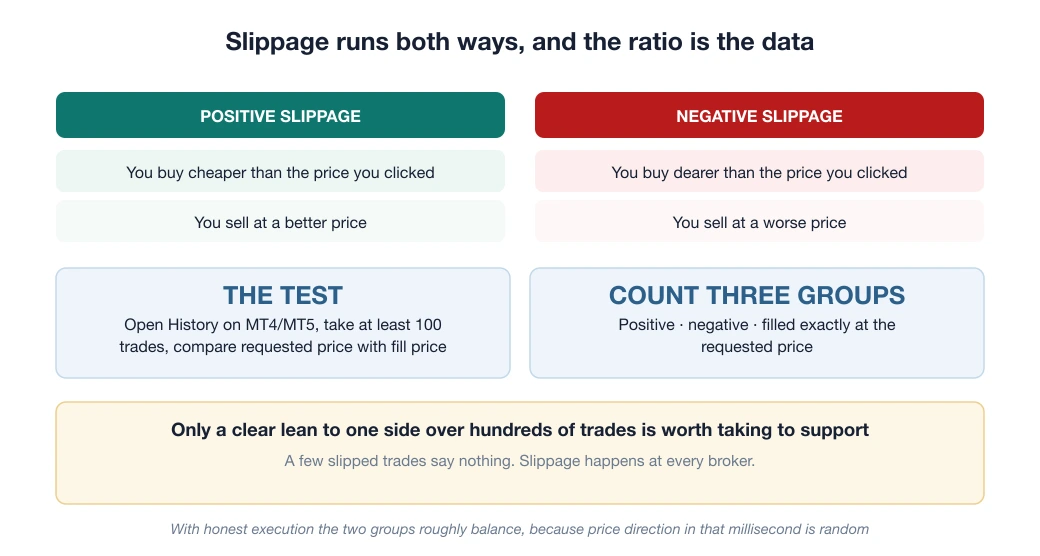
You click Buy or Sell and the order fills at once at the best price available. It is the simplest type, but one point needs understanding: the price you see when you click is not a guaranteed price. In the milliseconds between clicking and filling, the price can change. That is slippage.
A setting worth switching on: the order window in MT4/MT5 has a maximum deviation field. Set a threshold, for example 3 pips: if the price moves further than that, the order does not fill instead of filling at a bad price. You give up the certainty of getting in to keep control over the price.
The four pending orders: tell them apart with a single question
Many articles list four definitions and leave you to memorise them. There is an easier way: ask whether you want to enter when the price is BETTER than now, or once the price has already MOVED the way you expect.
| Enter when the price is better than now (you expect a reversal) | Enter once the price has moved your way (you expect the trend to continue) | |
|---|---|---|
| Want to BUY | Buy Limit placed BELOW the current price | Buy Stop placed ABOVE the current price |
| Want to SELL | Sell Limit placed ABOVE the current price | Sell Stop placed BELOW the current price |
A rule you can remember in 5 seconds: a Limit always sits on the side that is more favourable to you, buying cheaper and selling dearer. A Stop always sits on the less favourable side, buying dearer and selling cheaper.
It sounds backwards, but a Stop is for entering with momentum: you only buy once the price has shown it is rising.
The key point: a Stop order fills like a market order
A Limit order guarantees the PRICE but not the fill. Place a Buy Limit at 1.09200 and it either fills at exactly 1.09200 (or better), or it does not fill at all. It will not fill at 1.09230.
A Stop order is the reverse: it guarantees the fill but not the price. When the price touches your level, the Stop order turns into a market order, and from that second on it takes slippage exactly like any other market order.
And your stop loss is a Stop order. That is why a stop loss sometimes fills further away than the level you set, especially during strong news or at the weekly open, when the price jumps straight past the zone where your order sits. It is not the broker cheating. It is how this order type works.
There is one way around it: a stop limit, which turns into a Limit order instead of a market order when triggered.
But it carries a much bigger risk: if the price moves too fast, the order does not fill and you are left in a losing position while believing you are out. For a stop loss, a late fill is still better than no fill.
Spread widening hits pending orders in a way you cannot see
One technical detail decides whether your order gets triggered unfairly: buy orders fill at the Ask price, sell orders fill at the Bid price. MT4/MT5 charts show only the Bid line by default.
So when you look at the chart and see that the price has not reached the stop loss on your buy order, the Ask line, which is the one that counts, may already have touched it.
The gap between the two lines is the spread (the difference between the buy and sell price, in other words the fee you pay), and when the spread widens that gap gets noticeably larger.
This is the real origin of many “the broker hunted my stop loss” accusations. Checking takes 30 seconds: in MT4/MT5, turn on the Ask line (right-click the chart → Properties → Common → Show Ask line). You will see exactly what your order is touching.
Which order type to use: by situation, not by preference
- You need to get in now and accept a few pips of difference: a market order, with the deviation limit switched on.
- You have a clear target price and are not in a hurry: a Limit. This is also the most effective way to cut slippage.
- You want to enter when the price breaks a resistance or support zone: a Stop, knowing in advance that it can slip, especially when the break happens right at news time.
- Setting a stop loss: always use a plain Stop, not a stop limit. Being sure you can get out comes first.
One thing to avoid: placing your stop loss too close to your entry. The distance has to cover both the normal spread and the widening you usually see on the pair you trade; otherwise the order is closed by your own trading cost rather than by the market.
Who absorbs the negative balance when a Stop fills too far away?
In an extreme case, such as a price jump after shock news, a stop loss can fill so far away that the account falls below the amount you deposited. At that point the question is no longer about how you placed the order:
- Under an EU or Australian regulator: negative balance protection is a legal obligation for retail clients, and the broker must wipe out the negative balance.
- Under an offshore entity: it is a broker policy, which the broker sets itself and can change itself.
Same Stop order, same price jump: two people can face completely different consequences just because the company name on their contract is different. The details are in the article on whether a Tier-1 licence protects Vietnamese clients.
Frequently asked questions
What is the difference between a Buy Limit and a Buy Stop?
A Buy Limit is placed BELOW the current price. You want to buy when the price falls to a better level, meaning you expect it to turn back up. A Buy Stop is placed ABOVE the current price. You only buy once the price has shown it is rising, meaning you enter with momentum. The general rule: a Limit always sits on the side more favourable to you, a Stop always on the less favourable side.
Why did my stop loss fill further away than the level I set?
Because a stop loss is a Stop order, and a Stop order turns into a market order the moment the price touches the trigger level. From that second on it takes slippage like any market order, especially during strong news or at the weekly open, when the price jumps straight past the zone where you placed it. This is how the order type works, not the broker interfering.
Which order type does not slip?
A Limit order. It guarantees the price but not the fill: it either fills at exactly the level you set (or better), or it does not fill at all. Market orders and Stop orders do the opposite: they guarantee the fill but not the price.
Why was my buy order closed when the price on the chart had not reached my level?
Because buy orders fill at the Ask price, while MT4/MT5 charts show only the Bid line by default. The gap between the two lines is the spread, and when the spread widens that gap gets larger. Turn on the Ask line: right-click the chart → Properties → Common → Show Ask line.
Spotted something inaccurate? Tell us and we will check it and publish a correction.