
How to open an XM account: a step-by-step beginner guide
If this is the first forex account you have ever opened, XM is one of the easier places to start: deposits from 5 USD, a Vietnamese-speaking support team, and a library of Vietnamese webinars and training material that is among the largest on the market.
I go slower than usual here and walk through even the questions on the registration form that make first-timers pause, because experience shows people give up at the sign-up screen more often than at the price chart.
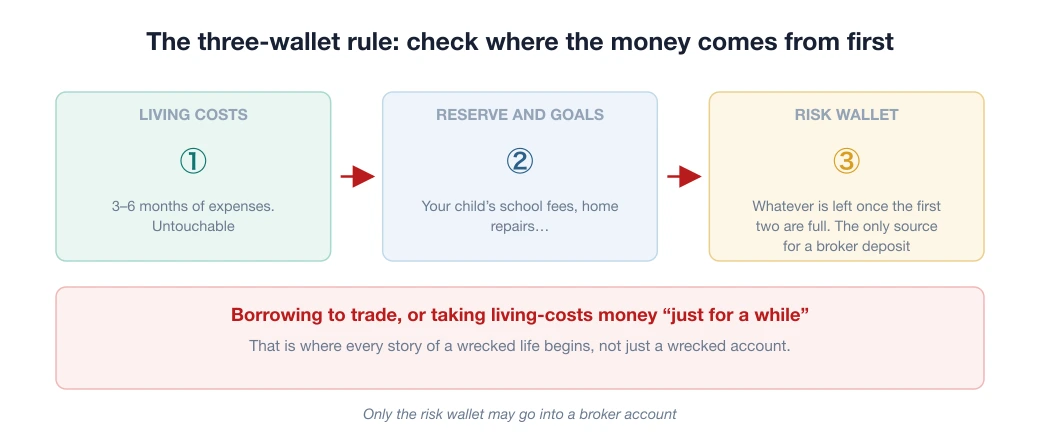
Before you click: two things to agree with yourself
- Your first deposit is tuition, not capital for getting rich. Depositing 50–100 USD in the spirit of “fine if I lose it, in exchange for real experience” will make you trade far better than the spirit of “I have to win it back”. The paradox of this trade: people who are not afraid to lose a small sum usually keep their money, and people who are afraid of losing it tend to lose the most.
- Do not open an account for the bonus. XM is known for its many promotions, but a bonus is the seasoning, not the main dish. The end of this guide explains how it works so you do not expect the wrong thing and end up disappointed for no reason.
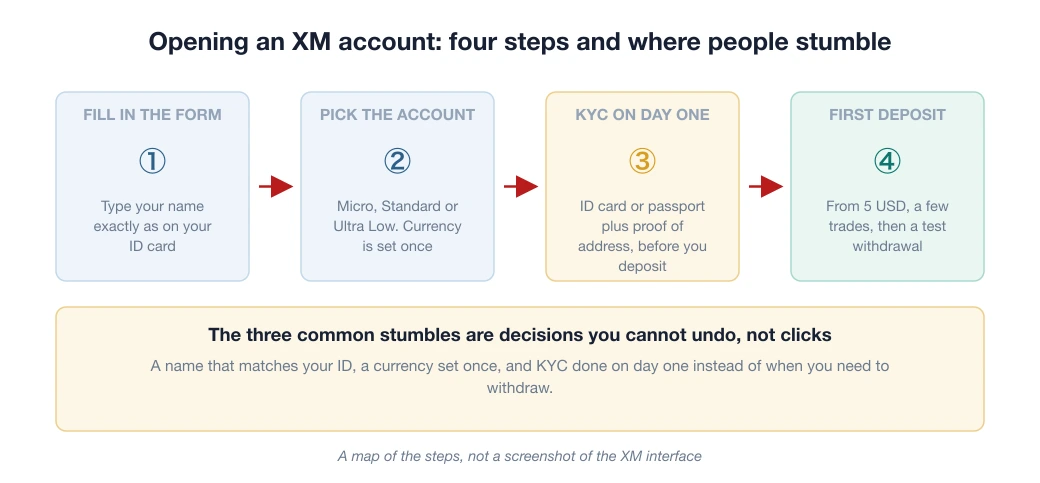
The four steps at a glance: look first, then start
The four steps below are the whole process. The three most common stumbles are not in the clicks but in decisions you cannot undo: the name must match your documents, the account currency is set once, and KYC is best done on day one rather than when you need to withdraw.
Step 1: Fill in the registration form (and the questions that confuse people)
Go to the official XM website, then Open an account. Besides your full name (typed exactly as on your ID card, without Vietnamese accents as the form instructs, “NGUYEN VAN AN” rather than “Nguyễn Văn An”), your email and your phone number, the form asks a few things that make newcomers pause:
- MT4 or MT5? Pick MT5 unless you have a specific reason not to: the software is newer, with more timeframes and tools, and most courses today illustrate with MT5. MT4 is still fine, mainly for anyone running an EA (an automated trading program) written for it. Picked the “wrong” one? No problem: opening an extra account on the other platform later takes a minute, under the same profile.
- Questions about your investment knowledge and experience: answer honestly. This is a suitability assessment required by the regulator, not an exam to pass or fail, and your answers do not affect your trading conditions.
- Account currency: pick USD, for the same reason as at any broker. Every calculator, document and statistic is quoted in USD, and choosing VND only makes it harder to compare.

Read the strip at the bottom of the page before you read the banner at the top. XM places the offer “Get a 100% bonus up to 100$” right above the email field, while the line “Risk warning: your capital is at risk. Leveraged products may not be suitable for everyone” sits at the bottom of the screen.
That display order is a design choice, not an order of importance. Opening an account just for the bonus is the wrong reason. We analyse this separately in the article on opening a forex account just for the sign-up bonus.

site@xmglobal.com. Remember the exact sender domain: fake broker emails are a common trick, and they usually use a lookalike domain. Screenshot of the Vietnamese interface.The “Code (optional)” box: the easiest field to skip, and the costliest one to skip
On the registration form there is a small box labelled “Code (optional)”. The word “optional” makes almost everyone scroll past it. But that box decides which introducing broker (IB) your account sits under. And that decides whether you get part of your trading costs back.

DCTopTrade’s code: BACK100
Enter this code in the “Code (optional)” box when you register, and your account will be attached to our rebate programme.
Your trading conditions do not change: the spread (the gap between the buy and the sell price, which is the fee you pay), commission, execution speed (the moment your order is actually filled) and leverage stay exactly as on an account opened directly.
The rebate is money paid back after your order has been filled, separate from your trading conditions.
Rebate rates from our table (updated 08/08/2026, paid daily): the Standard account earns 8.10 USD per lot (a unit of order size; 1 standard lot is 100,000 units) on EUR/USD and 15.30 USD per lot on gold, XAU/USD. The Ultra Low account earns 3.15 and 9.00 USD per lot respectively.
The full table by pair and by account type is in the article on the XM rebate. These are the rates of DCTopTrade’s IB programme on the update date, not a market-wide rate. The broker can change its policy at any time.
If you go straight to the XM website without using our link, the code box is the only way to get your account attached correctly.
And if you have already opened an account without entering the code, whether it can be reattached depends on the broker’s policy at the time. Ask first rather than opening a second account.
One note to avoid a misunderstanding: a rebate lowers your costs, it does not make a strategy better. Trading more lots to collect more rebate is backwards arithmetic. Treat backcom as a discount, not a source of income.
Step 2: Pick an account type using real-money examples
Say you open the smallest order (0.01 lot) on EUR/USD. Here is what happens on each type:
| Account | Deposit from | Spread | 0.01 lot means |
|---|---|---|---|
| Micro | 5 USD | from ~1.0 pip | On a 0.1 micro lot each pip is worth about 260 dong; a 30-pip move against you costs under 10,000 VND |
| Standard | 5 USD | from ~1.0 pip | 0.01 standard lot, each pip ≈ 0.1 USD; a ±30-pip trade is ±3 USD |
| Ultra Low | 5 USD | tighter than Standard | Like Standard, but each trade costs less in spread |
All three types start from 5 USD, so capital does not make the choice for you.
The practical way to choose: still learning and want tiny risk per trade → Micro (a true training ground; blowing the account costs about as much as a cup of milk tea); planning to trade regularly → Ultra Low, because its spread is tighter than Standard.
A pip is the smallest price step, usually the fourth decimal place. At 0.01 lot, every pip of tighter spread keeps about 0.1 USD per trade; over a few hundred trades that becomes real money against a starting balance of a few tens of USD.
Standard sits in between, and there is honestly little reason to pick it when Ultra Low exists.
The screen where XM itself says this product may not suit you
When you fill in your profile, XM asks you to enter your full name exactly as on your ID document. This is the most common place to fail KYC, because many people are used to typing their name without accents or abbreviating their middle name.

Then comes the suitability assessment. XM asks whether you have had forex training or have traded derivatives at least 15 times. If you answer No, the broker shows a warning block straight away, and these are the broker’s own words, not ours:
“Based on the information you have provided, we believe you may not have sufficient experience in forex and CFD trading… We strongly recommend that you open a demo account before opening a real account…”
“I acknowledge your warning that trading forex and Contracts for Difference is not suitable for me, but I still wish to proceed with opening an account.”

Most guides online skip past this screen with a quick “click Continue”. We think the opposite: this is the most honest screen in the whole process.
It is a suitability assessment the regulator requires, and if the broker says it that bluntly, the sensible thing is to do what they recommend and open a demo account first. You lose nothing by waiting a few more weeks; your first loss in real money is another matter.
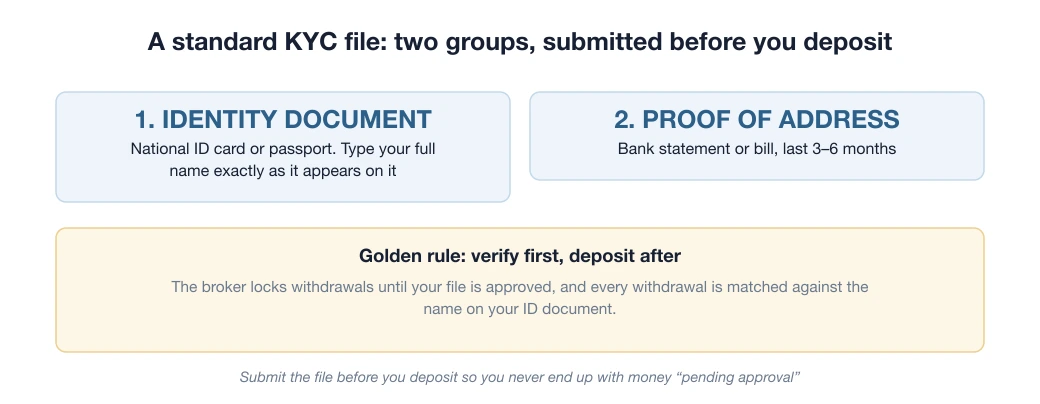
Step 3: KYC on day one
National ID card or passport plus a proof of address (a utility bill or bank statement from the last 6 months), in a name that matches the bank account you will use to deposit and withdraw.
Take the photos straight on, sharp, with all corners visible. The reasons XM returns a file are the same as at any broker: blurry photos, expired documents, a name that does not match.
Finish it before you deposit: that order makes sure you never end up with “money on hold pending document review”, the root of more than half of all complaints about forex brokers on forums.

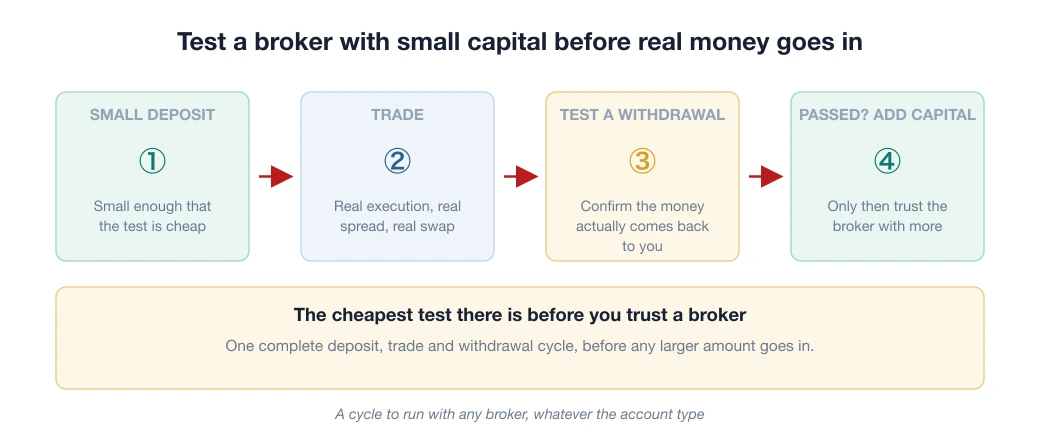
Step 4: Your first deposit
From 5 USD by bank transfer, Visa/Mastercard or e-wallet. XM charges no deposit or withdrawal fees on its side. For beginners I still recommend the same formula: deposit a small amount → place a few trades → test a withdrawal → only then deposit properly.
All the details of the money flow, especially the three-way relationship between real money, bonus and profit (the biggest source of confusion at this broker), are in the article on XM deposits and withdrawals. Read it before you accept any promotion.

The “Leverage” field on the dashboard reads 1000:1.
Put the two side by side to see the gap: in Europe, ESMA caps retail leverage at 30:1 on major currency pairs and 20:1 on gold, so the level this account has is more than 30 times higher than the ceiling the European regulator considers safe for small retail investors.
High leverage is not a perk made for you. It can only exist at a legal entity, meaning the specific company that signs the contract with you, sitting outside the reach of those limits. It magnifies gains and losses by exactly the same ratio.
A second detail on the same screen: the dark strip at the top reads “Verify your account to unlock the 100% Deposit Bonus”. The bonus is tied to completing verification, one more reason to do KYC on day one rather than when you need to withdraw.
From the second login onwards, the usual confusion is where to log in. The separate article on telling the Members Area apart from MT4/MT5 when logging in to XM also covers how to spot a fake login page.
Use what XM does best: training in Vietnamese
What really sets XM apart for Vietnamese newcomers is not the spread but the learning ecosystem: regular Vietnamese webinars, a video library from basic to advanced, and a Vietnamese chat support team that replies quickly.
A concrete tip: after opening your account, spend the first 2 weeks trading Micro while following a webinar series. Place a Micro order right after a session, while the content is still fresh, and it sticks far longer than watching every video first and only then opening the platform.
Add our series on technical analysis and the article on how much money to start with for a foundation of knowledge.
About the XM bonus: a one-minute read to avoid disappointment later
How a broker bonus normally works: bonus money cannot be withdrawn directly. It sits in the account as margin, the amount locked up to hold your open positions, letting you trade larger volumes.
Only the profit it generates can be withdrawn, under the conditions of each programme. The logical consequence: a bonus is useful for people who would trade anyway, and nearly pointless for someone depositing just to “grab the bonus”.
One more thing few people mention: when you withdraw real money, the bonus is usually reduced in proportion, so your withdrawal plan and your bonus plan have to be worked out together.
If a programme’s volume conditions are well beyond what you can reach, declining the bonus is a perfectly reasonable decision that many experienced traders make.
For a closer look at the legal side (ASIC/CySEC/DFSA, and why we rate XM highest in the beginner segment), see the XM review 2026. For head-to-head comparisons with rivals in the same segment, see XM vs FBS and XM vs OctaFX.
Frequently asked questions
How much money do I need to open an XM account?
XM lets you deposit from as little as 5 USD, among the lowest on the market, which suits beginners who want to try with small capital.
Can the XM bonus be withdrawn?
XM bonus money usually cannot be withdrawn directly; it is used as margin for trading. Only the profit generated from trading can be withdrawn, under the conditions of the programme. Always read the bonus terms carefully.
Does XM have a demo account?
Yes. XM offers a free demo account so you can practise trading before using real money, and it is worth using for at least a few weeks.
- XM. Account types, archived 13/10/2026 (read 20/10/2026): 5 USD minimum deposit for Standard, Ultra Low and Zero
- ESMA (27/03/2018). The figure to know before opening your first account: 74–89% of retail accounts lose money, with average losses of 1,600–29,000 EUR per client
- CFTC (US). Forex fraud advisory: recommends checking a firm’s registration status and matching the legal entity name before depositing any amount
Spotted something inaccurate? Tell us and we will check it and publish a correction.